Widgets
Add stats, lists and other blocks above, beside or below a resource's grid
You can add widgets to a resource's index page, such as a count of the bookings the grid lists, or a list of upcoming departures beside the grid. Index page widgets work like home page widgets: each one is rendered using a partial view that you write, and can have a handler that loads its data.
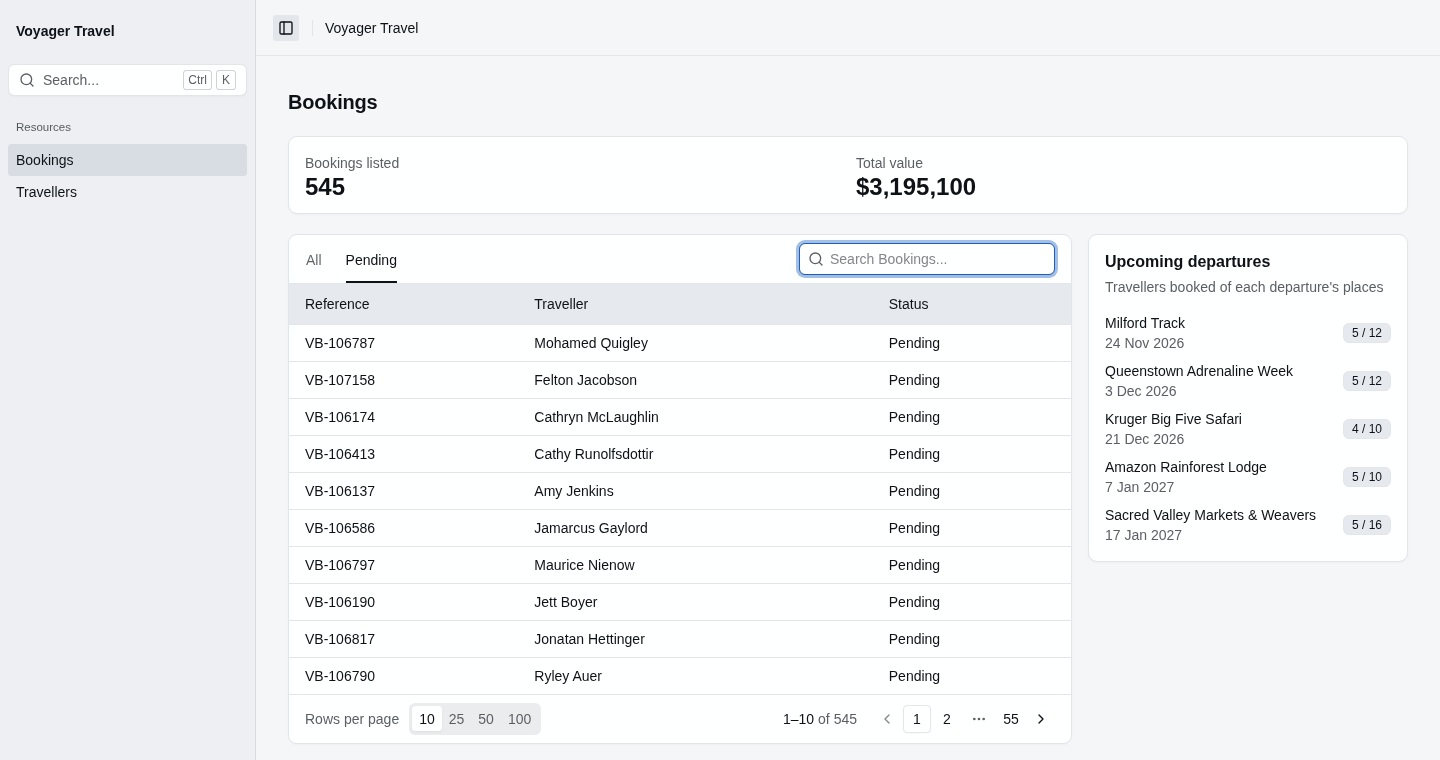
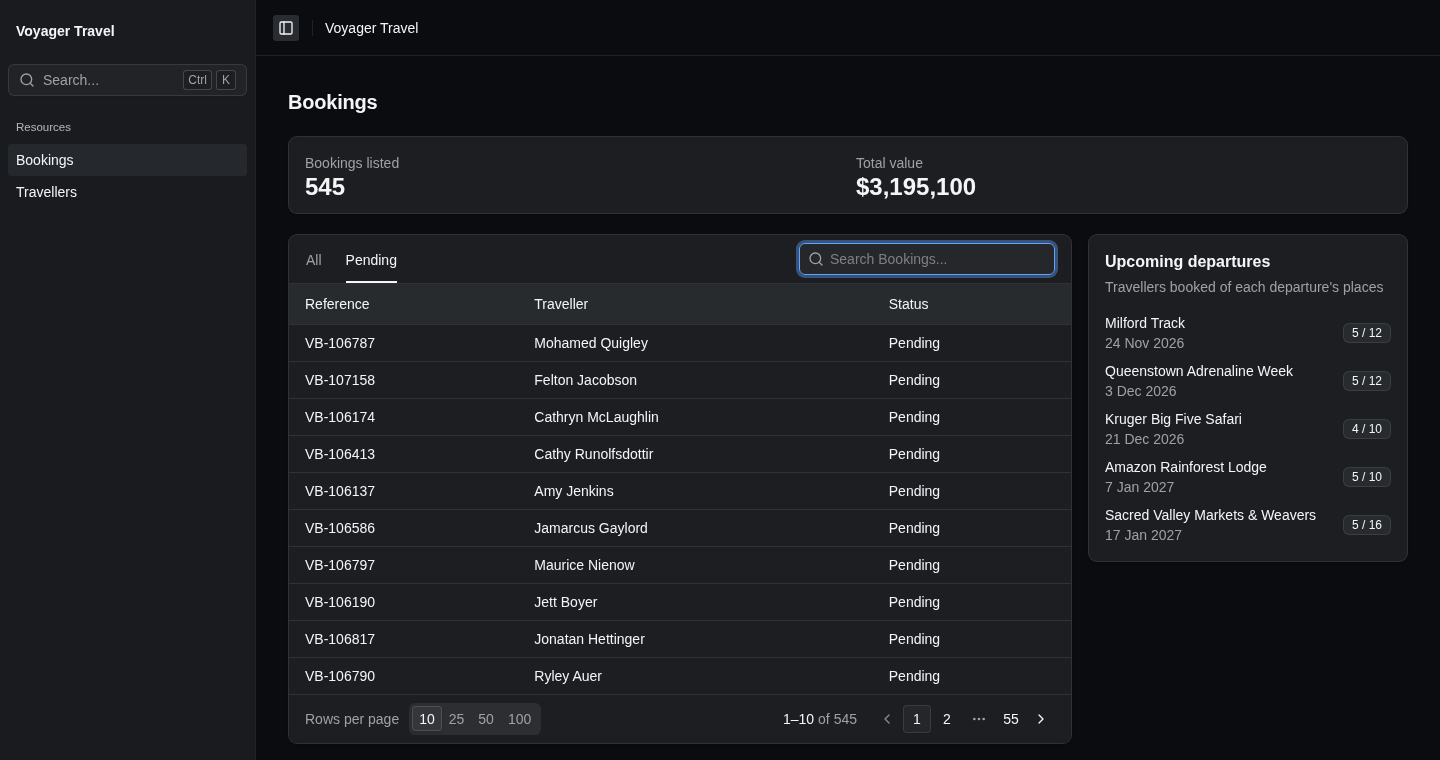
Adding a widget
To add widgets to an index page, call Widgets() in the Index() callback, and add each widget with Add(). The example below adds a widget above the bookings grid that renders the _BookingTotalsWidget partial view, with data loaded by BookingTotalsHandler:
builder.Services.AddStellarAdmin(admin =>
{
    admin.AddEfCoreResource<Booking>(resource =>
    {
        resource.Index(index =>
        {
            index.Widgets(widgets =>
            {
                widgets.Add<BookingTotalsHandler>("Totals", "_BookingTotalsWidget");
            });
        });
    });
});
Handlers, parameters, controls and the other widget settings work as they do on the home page. See home page widgets for how to write them.
Put the partial view in Areas/StellarAdmin/Views/{slug}/, such as Areas/StellarAdmin/Views/bookings/. To use a partial view on several pages, put it in Areas/StellarAdmin/Views/Shared/.
Choosing where a widget is displayed
To choose where a widget is displayed, set Placement in the widget's callback to one of the following:
| Value | Description |
|---|---|
WidgetPlacement.Top | Above the grid. This is the default. |
WidgetPlacement.Aside | In a column beside the grid. When the page is narrow, the column is displayed below the grid. |
WidgetPlacement.Bottom | Below the grid. |
The example below displays a list of upcoming departures beside the bookings grid:
resource.Index(index =>
{
    index.Widgets(widgets =>
    {
        widgets.Add<UpcomingDeparturesHandler>("Upcoming departures", "_UpcomingDeparturesWidget", widget =>
        {
            widget.Placement = WidgetPlacement.Aside;
        });
    });
});
Widgets above and below the grid are displayed in a grid of 12 columns, as on the home page, so Span sets how many columns each one spans. Widgets beside the grid are stacked in one column, so Span doesn't apply to them.
Following the search and scope
The functions you pass to Parameters() and ShowWhen() receive an IndexWidgetContext<TResource>. Besides the HttpContext, User and Services of a WidgetContext, it has the following properties:
| Property | Description |
|---|---|
Search | The text the grid is searched for, trimmed, or null when the grid isn't searched. |
Scope | The id of the selected scope, or null when the resource has no scopes. |
StellarAdmin renders the widgets again when the search or the scope changes, so these functions receive the new values. Sorting and paging the grid leave the widgets as they are. A widget without a handler receives the IndexWidgetContext<TResource> as its partial view's model.
A handler only receives what Parameters() returns. To summarize the records the grid lists, pass the search and the scope to the handler, and filter the records the same way the grid does. The example below counts the bookings that the grid lists, for a grid with a Pending scope and a search on the booking's reference:
using StellarAdmin.Widgets;

public record BookingTotalsParameters(string? Scope, string? Search);

public record BookingTotals(int Count);

public class BookingTotalsHandler(ApplicationDbContext db)
    : IWidgetHandler<BookingTotalsParameters, BookingTotals>
{
    public async Task<BookingTotals?> LoadAsync(
        BookingTotalsParameters parameters,
        WidgetLoadContext context,
        CancellationToken cancellationToken)
    {
        var bookings = db.Bookings.AsQueryable();
        if (parameters.Scope == "pending")
        {
            bookings = bookings.Where(booking => booking.Status == BookingStatus.Pending);
        }

        if (parameters.Search is { } search)
        {
            bookings = bookings.Where(booking => booking.Reference.Contains(search));
        }

        return new BookingTotals(await bookings.CountAsync(cancellationToken));
    }
}
The example below passes the grid's scope and search to BookingTotalsHandler:
resource.Index(index =>
{
    index.Widgets(widgets =>
    {
        widgets.Add<BookingTotalsHandler>("Totals", "_BookingTotalsWidget", widget =>
        {
            widget.Parameters(context => new BookingTotalsParameters(context.Scope, context.Search));
        });
    });
});