Rich text
Formatted text stored as HTML
Introduction
The rich text editor allows users to edit formatted text, such as headings, lists, links and tables, and stores it as HTML in a string property. A property with [DataType(DataType.Html)] is rendered as a rich text editor:
public class Trip
{
    [DataType(DataType.Html)]
    public string? Description { get; set; }
}
The editor has a toolbar with the typical functions you will find in rich text editors. It also supports slash commands (i.e. typing / at the start of a new line) for adding blocks, and Markdown shortcuts such as ##, - and >.
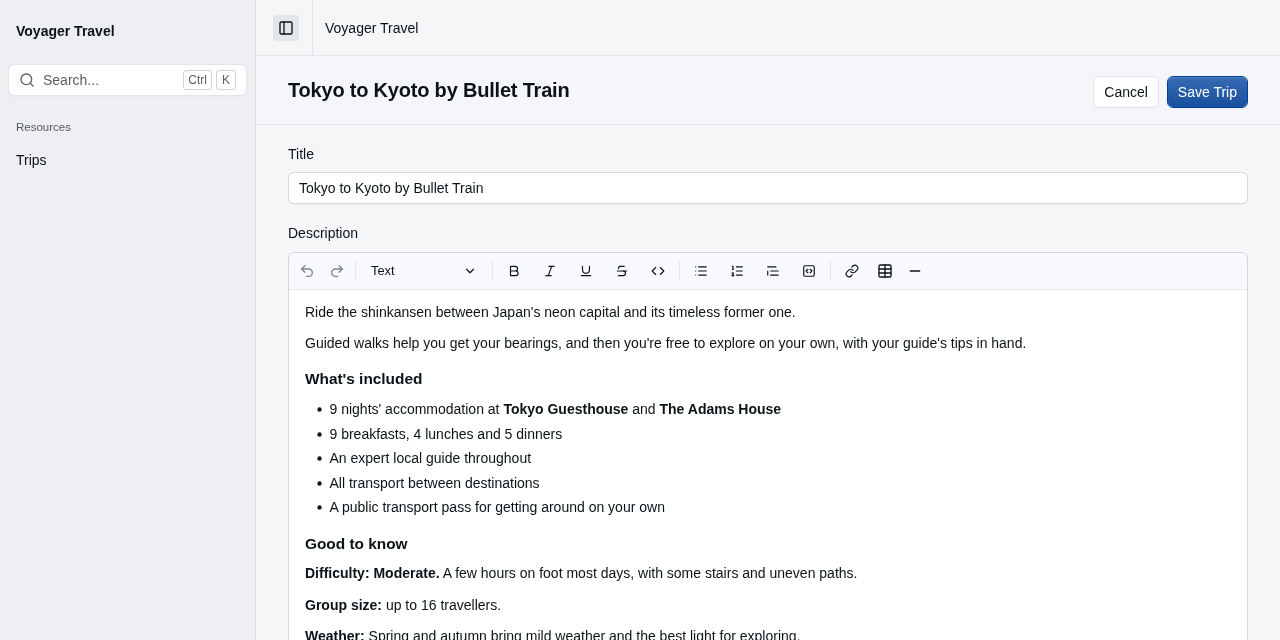

The rich text editor is only supported on forms and doesn't work in an inline row.
Changing the editor's settings
You can explicitly use the rich text editor for a property by calling UseRichTextEditor() and using the builder callback to configure the editor:
fields.Add(trip => trip.Description).UseRichTextEditor(editor =>
{
    editor.Placeholder = "What makes this trip special?";
    editor.Rows = 12;
});| Setting | What it does |
|---|---|
Placeholder | Sets the text displayed while the editor is empty. |
Rows | Sets the number of lines the editor has room for before it grows. The default is 8. |
Add image support
To allow users to insert images in the rich text editor, you must call StoreImage() on the builder and specify a function that saves the image. The function must save the file and return a string with the URL the text loads the image from. The URL can be relative, such as /photos/beach.jpg.
The example below saves the photo with the PhotoStore from the image editor page, which returns the file name, and turns the file name into a URL:
fields.Add(trip => trip.Description).UseRichTextEditor(editor =>
{
    editor.StoreImage(async (file, services, cancellationToken) =>
    {
        var photos = services.GetRequiredService<IPhotoStore>();
        var fileName = await photos.SaveAsync(file, cancellationToken);

        return $"/photos/{fileName}";
    });
});
When image support is enabled, users can also paste and drop to insert images.
Sanitizing the HTML
StellarAdmin sanitizes the HTML when the form is saved, and again when the HTML is rendered. The default sanitizer keeps the elements supported by the editor: headings, paragraphs, lists, quotes, code, tables, links, images and line breaks. It keeps http, https and mailto links and relative URLs, and removes everything else, including scripts, event handlers, styles and classes.
You can write a custom sanitizer by creating a class that implements IRichTextSanitizer and registering it with the DI container.
using StellarAdmin.Resources;

builder.Services.AddSingleton<IRichTextSanitizer, VoyagerSanitizer>();