Data from a handler
Display data other than the resource's records in a data layout, and link it to records
Introduction
You may want to display data that doesn't come from the resource's data source in a data layout, such as the revenue per destination calculated from the bookings, or data from another service. StellarAdmin allows you to create handlers that load the data layout's items.
Writing a handler
There are two kinds of handler. For an EF Core resource, prefer an IEfCoreDataLayoutHandler<TEntity, TItem>, so that StellarAdmin applies the search and the scope for you. Otherwise, implement IResourceDataLayoutHandler<TItem>. In both, TItem is the type of the data layout's items.
Reshaping EF Core records
An IEfCoreDataLayoutHandler<TEntity, TItem> reshapes the resource's records into the data layout's items. Its ListAsync() method receives a query of the records that are filtered according to the search and selected scope, and must return the items and the total number of items in a ResourceListResult<TItem>.
The example below calculates the number of bookings and the revenue per destination:
using StellarAdmin.EntityFrameworkCore;
using StellarAdmin.Resources;

public record DestinationRevenue(int DestinationId, string Destination, int Bookings, decimal Revenue);

public class DestinationRevenueHandler : IEfCoreDataLayoutHandler<Booking, DestinationRevenue>
{
    public async Task<ResourceListResult<DestinationRevenue>> ListAsync(
        IQueryable<Booking> bookings,
        ResourceListRequest request,
        CancellationToken cancellationToken)
    {
        var items = await bookings
            .GroupBy(booking => new
            {
                booking.Departure.Trip.DestinationId,
                booking.Departure.Trip.Destination.Name,
            })
            .OrderBy(destination => destination.Key.Name)
            .Select(destination => new DestinationRevenue(
                destination.Key.DestinationId,
                destination.Key.Name,
                destination.Count(),
                destination.Sum(booking => booking.TotalAmount)))
            .ToListAsync(cancellationToken);

        return new ResourceListResult<DestinationRevenue>(items, items.Count);
    }
}
Because the query contains only the bookings that match the search and the selected scope, searching for a booking reference displays the revenue of the matching bookings only.
Loading items yourself
If you want complete control of the data you return, you can create a handler that implements IResourceDataLayoutHandler<TItem>. Its ListAsync() method receives the search and the selected scope via the Search and Scope properties of the request parameter, and must apply them itself.
The example below loads the departures per day from a service:
using StellarAdmin.Resources;

public record DepartureDay(DateOnly Date, int Departures);

public class DepartureDaysHandler(DepartureCalendar calendar) : IResourceDataLayoutHandler<DepartureDay>
{
    public async Task<ResourceListResult<DepartureDay>> ListAsync(
        ResourceListRequest request,
        CancellationToken cancellationToken)
    {
        var items = await calendar.ListDaysAsync(request.Search, cancellationToken);

        return new ResourceListResult<DepartureDay>(items, items.Count);
    }
}
StellarAdmin registers the handler as a scoped service, unless you've already registered it, so you can inject services into its constructor.
Displaying the items in a table
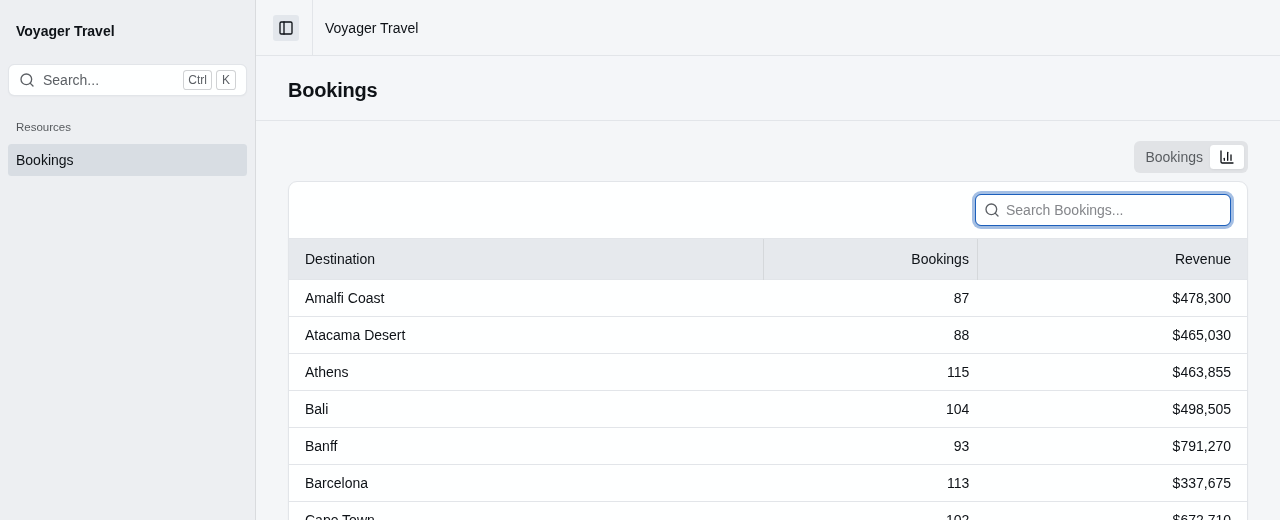
To display the items in a table, pass the item type and the handler as the type arguments of AddTable<TItem, THandler>(). The columns select the properties of the item type:
resource.Index(index =>
{
    index.EnableSearch(term => booking => booking.Reference.Contains(term));
    index.AddTable("bookings", table =>
    {
        table.Columns(columns => columns.Add(booking => booking.Reference));
    });
    index.AddTable<DestinationRevenue, DestinationRevenueHandler>("revenue", table =>
    {
        table.Title = "Revenue per destination";
        table.Icon = "chart-column";
        table.Columns(columns =>
        {
            columns.Add(item => item.Destination);
            columns.Add(item => item.Bookings);
            columns.Add(item => item.Revenue, column =>
                column.UseDisplay<NumberDisplay>(number => number.Format = "C0"));
        });
    });
});
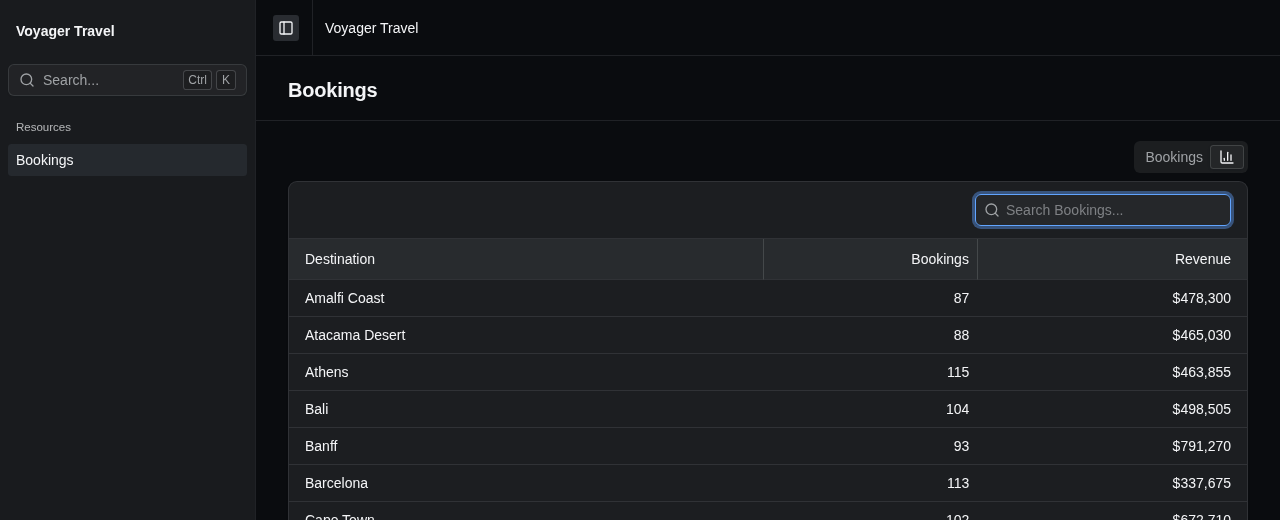
A table of items has no row details and no inline editing. Its rows have no row actions unless you link them to records.
Sorting and paging the items
When the table has sortable columns or paging, the handler must sort and page the items. StellarAdmin passes the requested sort and page via the Sort and Paging properties of the request parameter. Sort.Field is the name of the property the column sorts by.
The example below makes the revenue column sortable and pages the table:
index.AddTable<DestinationRevenue, DestinationRevenueHandler>("revenue", table =>
{
    table.Columns(columns =>
    {
        columns.Add(item => item.Destination);
        columns.Add(item => item.Revenue, column =>
            column.Sortable().UseDisplay<NumberDisplay>(number => number.Format = "C0"));
    });
    table.DefaultSortByDescending(item => item.Revenue);
    table.EnablePaging();
});
The handler below sorts by revenue when it's requested, breaks ties by destination, and returns only the items for the requested page:
public async Task<ResourceListResult<DestinationRevenue>> ListAsync(
    IQueryable<Booking> bookings,
    ResourceListRequest request,
    CancellationToken cancellationToken)
{
    var rows = bookings
        .GroupBy(booking => new
        {
            booking.Departure.Trip.DestinationId,
            booking.Departure.Trip.Destination.Name,
        })
        .Select(destination => new
        {
            destination.Key.DestinationId,
            destination.Key.Name,
            Bookings = destination.Count(),
            Revenue = destination.Sum(booking => booking.TotalAmount),
        });

    rows = request.Sort is { Field: nameof(DestinationRevenue.Revenue) } sort
        ? sort.Direction == ResourceSortDirection.Ascending
            ? rows.OrderBy(row => row.Revenue).ThenBy(row => row.Name)
            : rows.OrderByDescending(row => row.Revenue).ThenBy(row => row.Name)
        : rows.OrderBy(row => row.Name);

    var total = await rows.CountAsync(cancellationToken);
    if (request.Paging is { } paging)
        rows = rows.Skip((paging.Page - 1) * paging.PageSize).Take(paging.PageSize);

    var items = await rows
        .Select(row => new DestinationRevenue(row.DestinationId, row.Name, row.Bookings, row.Revenue))
        .ToListAsync(cancellationToken);

    return new ResourceListResult<DestinationRevenue>(items, total);
}
The handler sorts and pages an anonymous type, and creates the DestinationRevenue items last, because EF Core can't translate a sort on the properties of a record that the query creates.
Return the total number of items with the page, as total does above, so that the table can display how many pages there are.
Displaying the items as cards
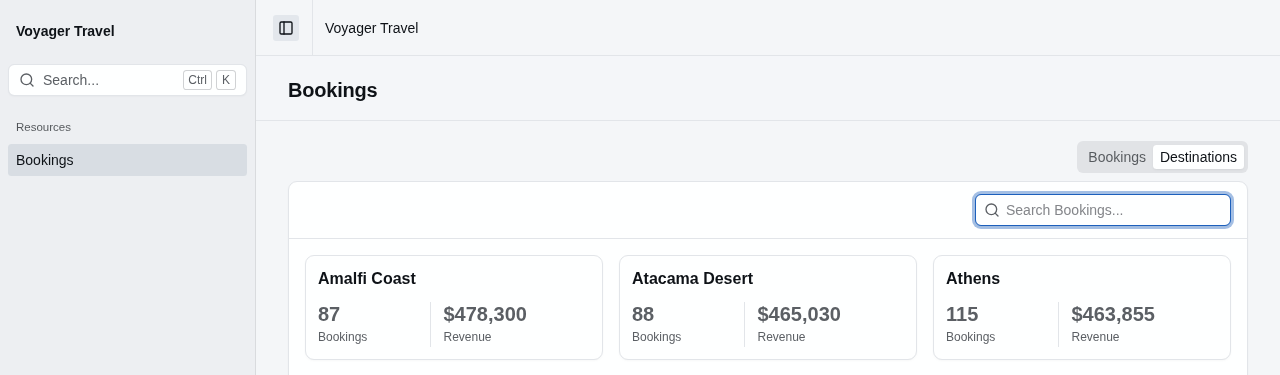
To display the items as cards, pass the item type and the handler as the type arguments of AddCards<TItem, THandler>(). The parts of the card select the properties of the item type:
index.AddCards<DestinationRevenue, DestinationRevenueHandler>("destinations", cards =>
{
    cards.Card(card =>
    {
        card.Title(item => item.Destination);
        card.Stats(stats =>
        {
            stats.Add(item => item.Bookings);
            stats.Add(item => item.Revenue, stat =>
                stat.UseDisplay<NumberDisplay>(number => number.Format = "C0"));
        });
    });
});
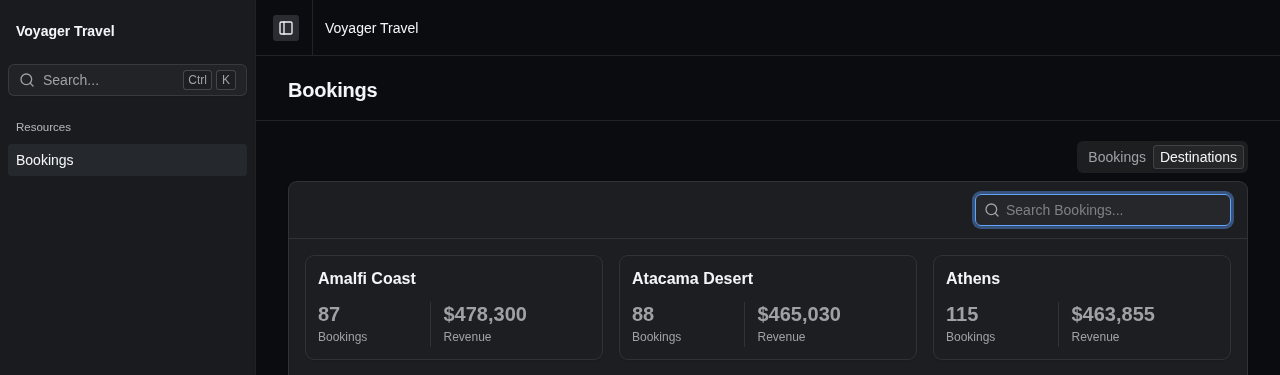
When you don't call Title(), the card's title is the key that the function passed to HasRecordKey() or LinkTo<TOther>() returns. Without either, the cards have no title, and StellarAdmin reports a configuration problem.
When the cards have a default sort or paging, the handler must sort and page the items, the same as for a table.
Displaying the items in a partial view
To display the items in a partial view, pass the item type and the handler as the type arguments of AddPartial<TItem, THandler>():
index.AddPartial<DestinationRevenue, DestinationRevenueHandler>("revenue-cards", "_RevenueCards");The partial view's model is a ResourceDataLayoutModel<DestinationRevenue>, with the handler's items in Items. A partial view has no paging, so Sort and Paging of the request are always null, and the handler must return every item. The model has the same members as the model of a partial view of records.
@using StellarAdmin.Resources
@model ResourceDataLayoutModel<DestinationRevenue>

<div class="grid grid-cols-3 gap-4">
    @foreach (var item in Model.Items)
    {
        <sa-card>
            <sa-card-header>
                <sa-card-title>@item.Destination</sa-card-title>
                <sa-card-description>@item.Bookings bookings</sa-card-description>
            </sa-card-header>
            <sa-card-content>@item.Revenue.ToString("C")</sa-card-content>
        </sa-card>
    }
</div>
Linking items to records
By default, items don't link to any record, so a table or cards of items have no row actions, and GetViewUrl() and GetEditUrl() of the partial view's model return null. To link each item to a record, call HasRecordKey() or LinkTo<TOther>() in the data layout's callback.
Linking items to the resource's records
When each item belongs to one of the resource's records, call HasRecordKey() with a function that returns the record's key. The rows of a table and the cards then display the view, edit and delete actions that are enabled on the resource, and RowActions() can hide them. In a partial view, GetViewUrl() and GetEditUrl() return the URLs of the record's pages.
The example below lists each booking's balance, with the actions of the booking:
public record BookingBalance(int BookingId, string Reference, decimal Total, decimal Paid);

index.AddTable<BookingBalance, BookingBalanceHandler>("balances", table =>
{
    table.HasRecordKey(item => item.BookingId);
    table.Columns(columns =>
    {
        columns.Add(item => item.Reference);
        columns.Add(item => item.Total);
        columns.Add(item => item.Paid);
    });
});
Linking items to another resource
When each item belongs to a record of another resource, call LinkTo<TOther>() with the other resource's type, and a function that returns the record's key. The rows of a table then display a view action that opens the other record's view page, and the title of each card links to that page. In a partial view, GetViewUrl() returns the URL of that page, and GetEditUrl() returns null.
The example below links each row of the revenue table to the destination:
index.AddTable<DestinationRevenue, DestinationRevenueHandler>("revenue", table =>
{
    table.LinkTo<Destination>(item => item.DestinationId);
    table.Columns(columns =>
    {
        columns.Add(item => item.Destination);
        columns.Add(item => item.Revenue, column =>
            column.UseDisplay<NumberDisplay>(number => number.Format = "C0"));
    });
});
The other resource must have a view page. If it doesn't, the items don't link, and StellarAdmin reports a configuration problem. When the signed-in user isn't authorized to view the other resource, the items don't link either.
When the function passed to HasRecordKey() or LinkTo<TOther>() returns null, the item doesn't link, such as for a row with the total of all bookings. A data layout can link its items in only one way, so calling both methods throws an InvalidOperationException.